A fee on every attempt
Most gateways charge for the attempt, not the sale. Three hundred bot attempts in an afternoon is three hundred line items you never earned a penny against.
Checkout Bouncer scores every checkout attempt with Google reCAPTCHA v3. That includes the block checkout, which several widely-installed captcha plugins still miss.
Free on WordPress.org. GPL licensed. No account and no signup: you only need free Google reCAPTCHA v3 keys.
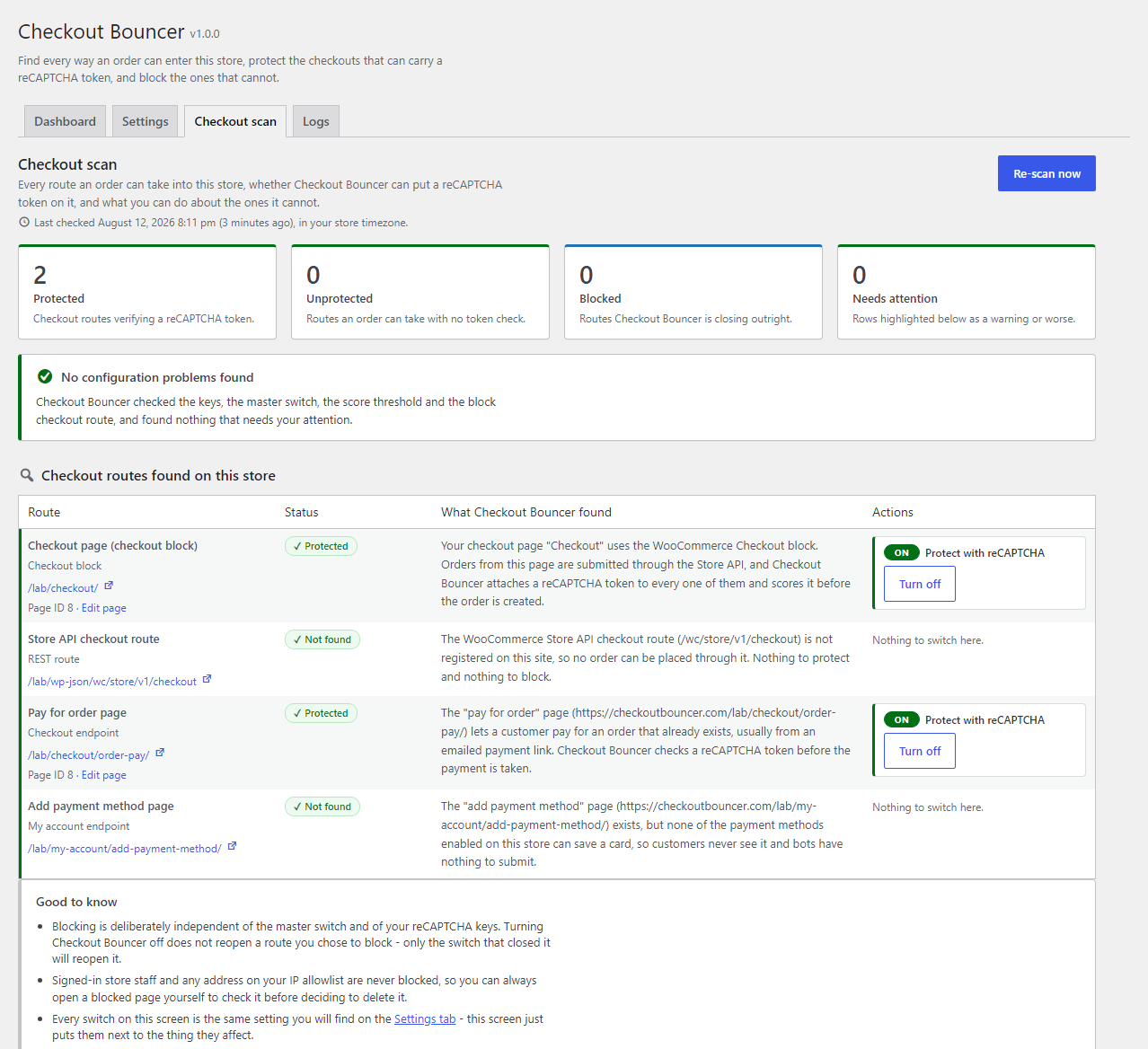
Example scan output. Your own result depends on how your store is built.
It has a list of stolen card numbers and it needs to know which ones still work. Your checkout is a free testing tool. It accepts a card, sends it to a real processor, and reports back in seconds. A script can repeat that hundreds of times an hour, usually with a cheap product and a throwaway email address.
The card was stolen from someone else. The bill lands on you.
Most gateways charge for the attempt, not the sale. Three hundred bot attempts in an afternoon is three hundred line items you never earned a penny against.
A card that passes gets used for a real order. Weeks later the cardholder disputes it. You lose the goods, the shipping, the payment and the dispute fee.
Processors watch your decline and dispute ratios. A sustained run of failed authorisations is exactly the pattern they flag. Accounts get reviewed, held, or closed.
Junk orders, junk customers, junk stock holds and junk numbers in every report. You start checking orders by hand, which is the most expensive part of all.
WooCommerce ships two checkouts. The old one is a shortcode page. The newer one is the block checkout, and it is what new stores get by default. They look similar to a customer. They do not submit the same way at all.
The classic checkout posts to WordPress and fires the classic WooCommerce checkout hooks. Those are the hooks a captcha plugin typically listens to. The block checkout submits through the WooCommerce Store API, a REST endpoint. Those classic hooks never fire there.
The plugin looks like it is working. The bot orders come through anyway.
[woocommerce_checkout]/wc/store/v1/checkoutCheckout Bouncer verifies both routes, and blocks the ones that cannot carry a token. It registers its own Store API endpoint data, so the reCAPTCHA token travels with the block checkout request and is verified on your server before the order is created.
The same goes for pay-for-order links, and for add-payment-method if you switch it on. Where a route cannot carry a token at all, Checkout Bouncer can block the route instead.
The token is verified on your server, against your threshold, before the order exists.
Scores shown are illustrative. 0.50 is Google’s recommended default.
Three jobs, in that order. You cannot protect a route you have not found, and some routes should not exist at all.
The Checkout Scanner finds your active checkout page and works out what actually renders it: block, classic shortcode, or one of six page builders (Elementor, Divi, WPBakery, Beaver, Bricks and Oxygen). Then it looks wider: duplicate or rogue checkout pages, whether the Store API route is exposed, and settings that quietly verify nothing.
Every route that can carry a token gets one: the classic shortcode checkout, the block checkout through the Store API, pay-for-order, and optionally add-payment-method. Google returns a score. Checkout Bouncer checks it on your server against your threshold before the order is created.
Some routes cannot carry a token, and some should not be reachable at all. The Store API checkout route can be hard-blocked with a 404 or a 403. Rogue duplicate checkout pages can be blocked outright. Checkout Bouncer never offers to block the store’s own active checkout.
All of it is in the free version. Nothing here is a teaser for an upgrade.
Store API endpoint data carries the token with the block checkout request, so those orders are scored like any other. This is the part several captcha plugins still skip.
Finds the real checkout, identifies the renderer, hunts duplicates, checks the Store API route, and flags settings that verify nothing. One click to fix each finding.
Per IP: maximum orders per hour, failed payments per 15 minutes, distinct billing emails per hour. Monitor mode logs everything without blocking while you tune it.
Apply the check to all gateways, or build an include or exclude list from your store’s real gateway list. Useful when one gateway is taking the abuse.
Staff roles skip the check so phone orders never get stuck. The IP allowlist accepts IPv4, IPv6 and CIDR ranges for your office, your VPN or your own testing.
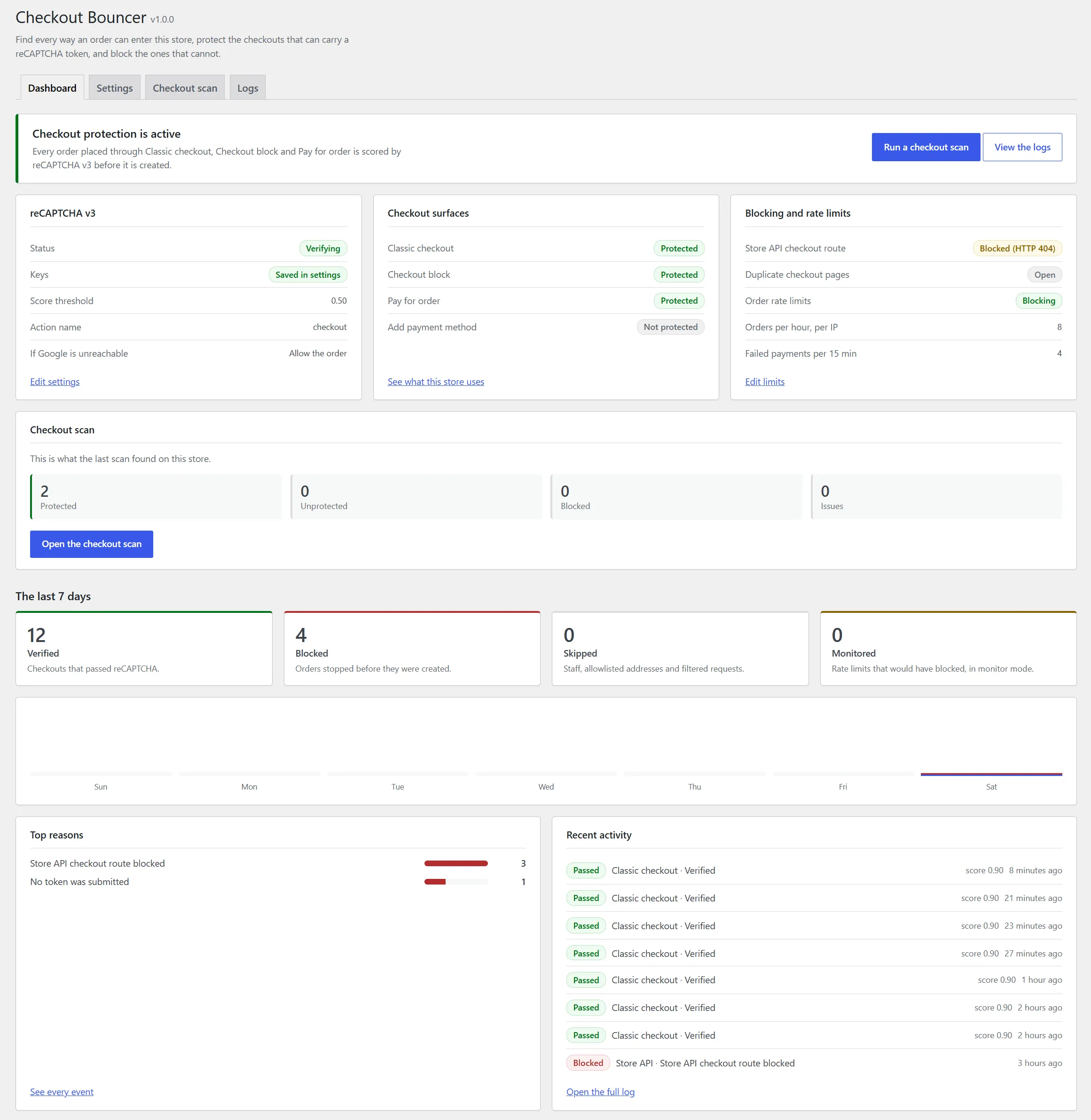
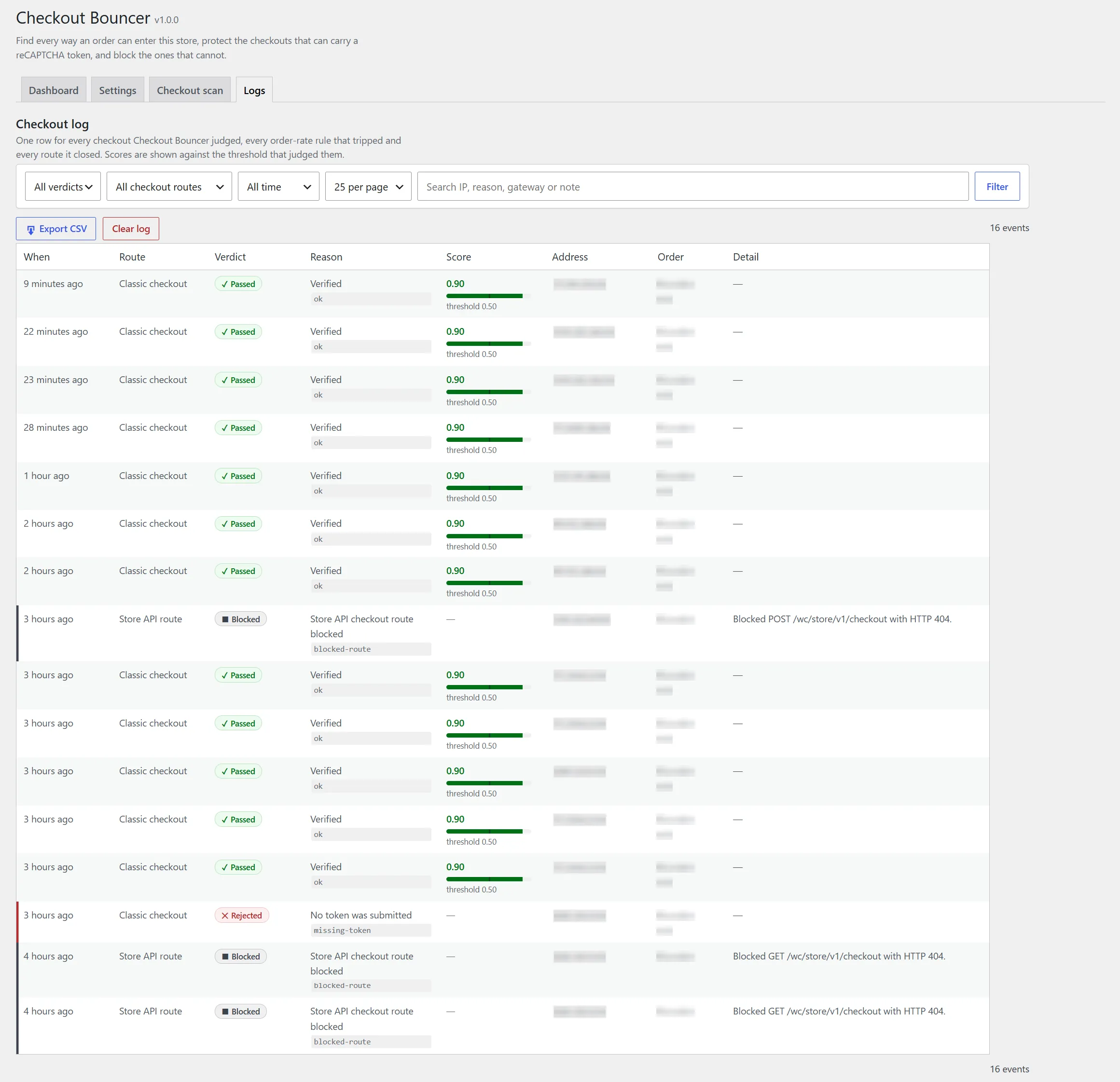
Pass, fail and block counts, the top reasons things were blocked, and a CSV export. Evidence you can show a processor, and a way to check you have not blocked a real customer.
Standard WordPress plugin. Needs WordPress 6.2 or newer, PHP 7.4 or newer and WooCommerce 7.0 or newer. It works with HPOS custom order tables and with the block checkout.
Google reCAPTCHA v3 keys are free and take about two minutes to create. Paste the site key and the secret key, leave the threshold at 0.5 or set your own, and decide whether to fail open if Google is unreachable.
The Checkout Scanner maps every route into your checkout and tells you which are protected and which are exposed. Work down the list and hit Protect or Block on each finding.
reCAPTCHA v3 loads sitewide by default. That is deliberate, and what Google recommends, because v3 scores a visitor on how they behave across the whole site rather than on one page view. If you would rather it only loaded on checkout screens, that is a setting.
Better you know this before you install it than after.
The questions people ask before installing it.
No. reCAPTCHA v3 is invisible. There is no puzzle, no image grid and no extra click. The visitor is scored in the background and the order goes through as normal.
That is your call. Fail-open is configurable. Leave it on and orders keep flowing when the verification call fails; turn it off and nothing gets through unverified. Either way the event is logged.
Every decision is written to the events table with the reason. The dashboard shows pass, fail and block counts and the top block reasons, and you can export the lot to CSV. The throttle also has a monitor mode that logs what it would have blocked without blocking anything.
It matters, which is why the scanner checks for it. It identifies checkouts rendered by Elementor, Divi, WPBakery, Beaver, Bricks and Oxygen as well as block and classic shortcode checkouts, so you find out what is really rendering the page rather than what you assume is.
Nothing. The WordPress.org version is free and fully functional, and everything on this page is in it. A Pro tier is planned but not released yet; you can join the waitlist any time.
Install it, add your free keys and run the scan. In a few minutes you will know which routes into your checkout are protected, which are wide open, and which ones should not be reachable at all.
Free and fully functional on WordPress.org. A Pro tier is coming. You can join the Pro waitlist.
Pro waitlist
The free plugin stays free. Join the launch list for founding pricing on Pro and one email when it is ready. Nothing else.
Received